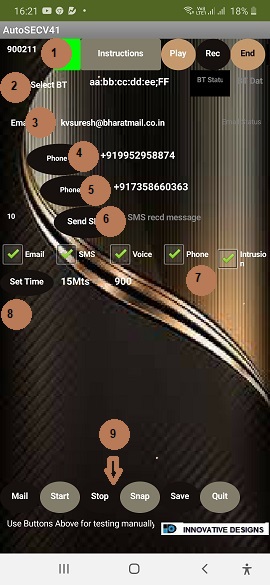
Before we activate and start using the
AUTOSEC we have to configure all
parameters and SAVE. 1.Registration
The un registered version will work for only 15 mins
and will automatically shut down after that.
We need to enter a vaild registration number.
2.Blue Tooth Operation
To communicatewith the Hardware Sensor unit
we need to pair the Android with Hardware unit.
For this, we have to get the ID of blue tooth.
Refer to the section on Blue Tooth pairing.3. Email ID
Please enter the Email ID of receiver Here.
4 & 5. Phone Numbers
Please enter the Phone numbers to
which SMS and calls to be sent.
7.Options
You can disable any funtion/feature
unticking the option not required.
Remember to SAVE after change.
8. Set Time
Once started, the unit will automatically
take photo every minute. At the end
of the Set Time period, the last photo
taken will be sent to you by Email
For Example, if your Set Time is
30 minutes, the unit will send Photo
through email every 30 minute.
Click on the Set Time button and
select the time from list shown.
Remember to SAVE after change.
9. Manual Controls
Use these buttons to manually
Mail - Send Email
Start Operations
Stop Operations
Save parameters
Snap Take a Photo
Activation
The unit can be activated and stopped
by using the manual controls.
It can also be activated by sending SMS